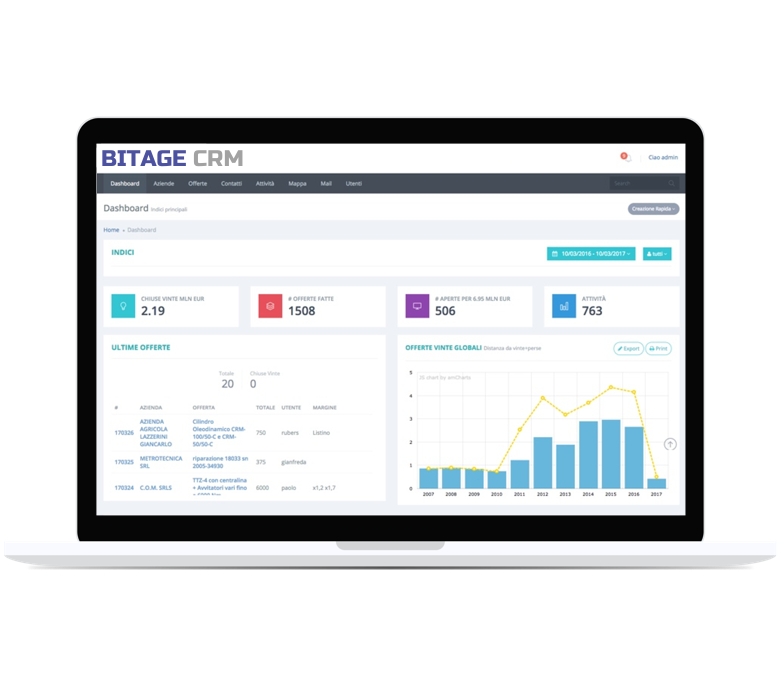
Advanced Dashboard
customisable, intuitive view with immediate control of key metrics and real-time KPIs.

Bitage CRM · Reporting
The advanced Dashboard of Bitage CRM is fully customisable and shows key metrics and KPIs in real time. Reporting tools generate customised, detailed reports, and budgeting lets you plan and monitor targets.
A report is built by selecting dimensions (agent, area, product, client, period) and compared with the budget; the chart rearranges with every filter.
What it solves
When sales data has to be collected from agents by hand and cross-checked with the management system, the report arrives late and already outdated. In Bitage CRM activities and quotes are already together and, with Bitage ERP, so is management data: you read the report, you don't build it.
Features
customisable, intuitive view with immediate control of key metrics and real-time KPIs.
detailed reports to support decisions, for example by agent, area, product, client and period. [DA COMPLETARE: confirm available dimensions and export.]
planning and monitoring, comparing targets and results.
from the Reports module, visits, calls and messages by client and by agent.
natural-language questions on the data, with the asker's permissions.
An advanced dashboard being customised. KPI tiles are dragged, added and resized, while values update in real time.
How it connects
Who uses it
NEXUS · powered by Mobox
NEXUS, the AI assistant powered by Mobox, works across all Bitage products, the CRM included. It answers in natural language about clients, quotes, activities and due dates, with the permissions of whoever is asking.
FAQ
Company Management with a detailed view of the client portfolio, Contacts, Activity Planning with scheduling and reminders, Reports module for visits, calls, notes and messages.
Exploresupplier relationships in the same system, with centralised product information and, with Bitage ERP, purchasing data.
Exploreadvanced Quote Management, Sales Agent Management, Product Information Management and B2B e-commerce, for structured sales networks.
ExploreDue Date Monitoring with notifications on payment deadlines; with Bitage ERP, in real time.
ExploreUser Management, APIs and interoperability, security and performance on AWS.
ExploreDemo
Tell us how your sales network is organised. We will show you Bitage CRM with quotes, agents and due dates and, if you use Bitage ERP, connected to the management system's data.